
A question in. Cited evidence out.In any language.
GUS Chat is the full-page conversational workspace at /gus. Type a question in English or Arabic, the way you would ask a colleague. A horizontal data agent picks the path, runs the lookups, and chains as many calls as the answer needs. A typical analytical turn is two to five tool calls. While it works you see live narration; when it's done you read a written answer with a map, chart, table, and citations appended below — whichever the answer needs.
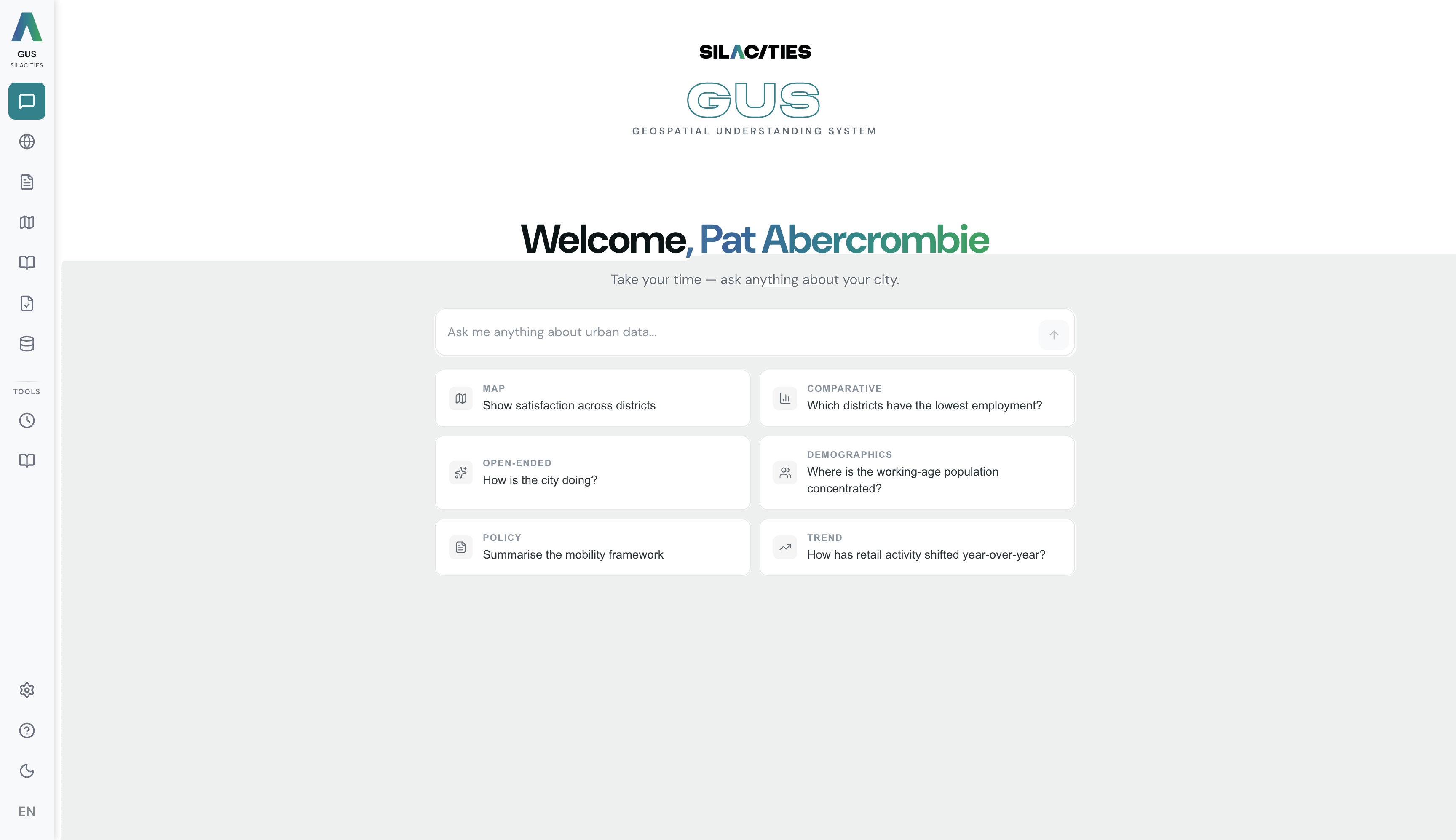
Type. Watch the agent. Read the cited answer.
The agent classifies your intent before touching any data, then chains the lookups the answer needs. You see every step.
Type your question
Plain English or Arabic. Suggested chips help you start, or write your own. Pure visualisation requests like "show me satisfaction on a map" short-circuit straight to the map render, no agent loop — the fastest path.
Watch the agent narrate
For analytical questions the agent loop takes over. A thinking indicator appears and live narration scrolls past · "Looking at satisfaction scores across districts…", "Fetching population data…", "Computing the correlation…". Typical turns chain two to five lookups before composing the reply.
Read the cited answer
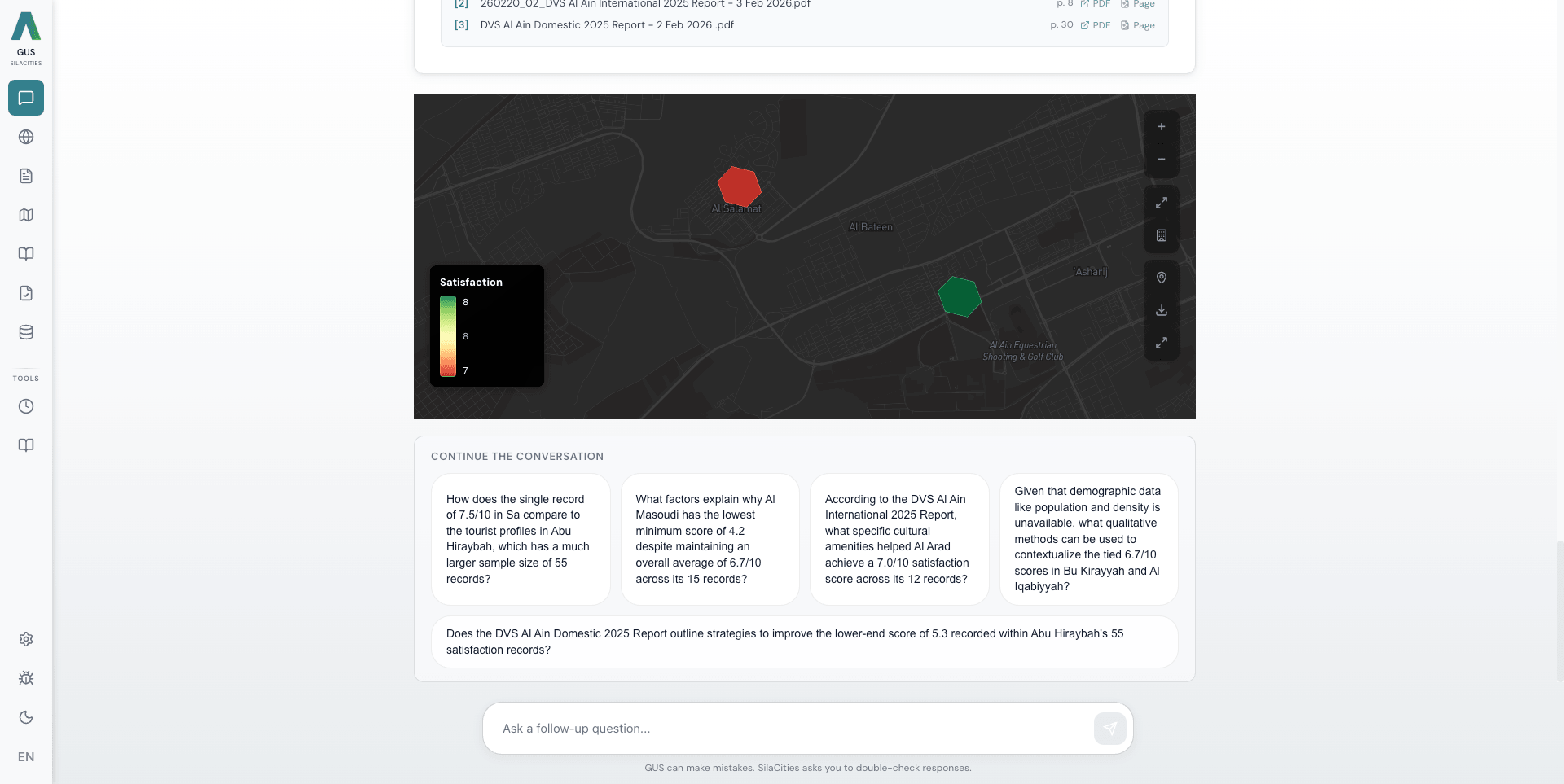
The reply lands as narrative text, then appends whatever the answer needs · interactive map with discussed districts highlighted, bar / line / scatter chart, sortable table, and a Sources referenced panel with inline [1][2] markers tied to document title + page number.
Follow up, branch, or export
Four context-aware follow-up chips, generated from the specific answer just written, sit below every reply. Thumbs up / thumbs down feedback is logged. Export the answer as PNG, PDF, or JSON. Chat History and Saved Chats live in the sidebar where the feature flag is on.
The right tool for every question — automatically.
Before any data is touched, the agent classifies your intent and picks a path. Sharp questions hit a sharp path in seconds. Vague questions trigger broad discovery — slower, less sharp. Naming the dimension you care about is the single biggest steering signal.
Map visualisation
Triggers on "show me X on a map", "map Y by district". Short-circuits straight to the map render with the AtlasMap toolbar attached — no agent loop.
Comparison
Triggers on "compare", "ranked", "top N", "highest / lowest". Fetches the metric for every named district, then builds a chart and table appended below the narrative.
Correlation · why
Triggers on "does X relate to Y?", "what drives satisfaction?", "why is X low?". Runs the correlation analysis, then searches documents for the explanatory narrative.
Time series
Triggers on "since YEAR", "year-over-year", "trend". Fetches the metric across the date range and renders a line chart.
What-if · projection
"If we increase X to Y, what happens to Z?" Runs a correlation-based projection and tags it explicitly as a projection — not a causal forecast.
Specific data lookup
"What's the population of X?", "satisfaction score for Y topic?". Fetches direct from the matching source — satisfaction, demographics, economic, activity.
Document · policy
"What does the master plan say about X?", "which documents mention Z?". Vector search across your indexed planning documents with page-level citations.
Place search
"Find restaurants near X", "where are the parks?". Searches activity places with optional category filter, renders on the map.
Accessibility · catchment
"What's reachable in 15 minutes walk of X?", "who lives in the service area of Y?". Geocodes the place, computes the isochrone, then aggregates demographics inside the boundary — typical three-step chain.
Product help
"How do I export this map?", "where do I upload a dataset?". Answers from product knowledge and points to the in-app report button for bugs.
User dataset
"Show me my uploaded layer X". Lists and queries datasets you own or have access to, alongside the platform's built-in sources.
Clarification fires when confidence drops · the agent shows two or three labelled chips, each a different interpretation, rather than guessing. Some chips offer a Render-on-a-map toggle. Click to re-run the question down that path. Domain shifts in a follow-up ("what does the plan say about this?" after a correlation thread) re-route cleanly; pure refinements ("top 5 instead", "filter to residents over 65") stay on the same path with thread context intact.
What makes it feel more like a colleague than a chatbot.
Watch the agent think
A thinking indicator appears the moment you send. Live narration scrolls past as the agent picks tools, runs queries, and chains results. You see what is happening, not a spinner.
Multi-step chaining
When the answer needs it, the agent chains calls — geocode the place, compute the catchment, pull demographics inside, fetch the satisfaction for the relevant districts, then write. Five tool calls, one answer.
Every claim, traceable
Inline [1] [2] markers in the prose tie to a Sources referenced panel below. Each entry shows the document title, page number, and a link to the source where permissions allow.
One reply, every visualisation
The narrative text comes back first. Then the map appends with discussed districts highlighted. Then the chart. Then the table. A comparison turn ends with all three visible at once, not toggled.
Says 'I don't know' when it doesn't
If the underlying data is too thin to answer honestly, GUS refuses with the reason on the page rather than fabricating. The refusal rate is logged and disclosed.
Arabic is native, not translated
The classifier is language-agnostic. An Arabic question hits the same routing path as the English equivalent — same agent, same sources, same citations. Dialect-aware sentiment across 20+ Arabic dialects.
The first AI tool our council members actually trust. Every number it gives us links back to the exact survey response it came from.