
Where should you open? Where should you invest?SQUID writes the answer.
GUS SQUID, our Site Qualification and Urban Investment Discovery tool, is the site selection workspace inside GUS. Three tabs · Analyze to score a candidate location, Compare to shortlist up to three side by side, Portfolio to archive everything you have saved. Click any hex on the map and SQUID returns a composite 0 to 100 score · the only 0 to 100 score in GUS, alongside Atlas’s 0 to 10 satisfaction scale · with a five-tab breakdown across Population, Satisfaction, Foot Traffic, Competition and Score.
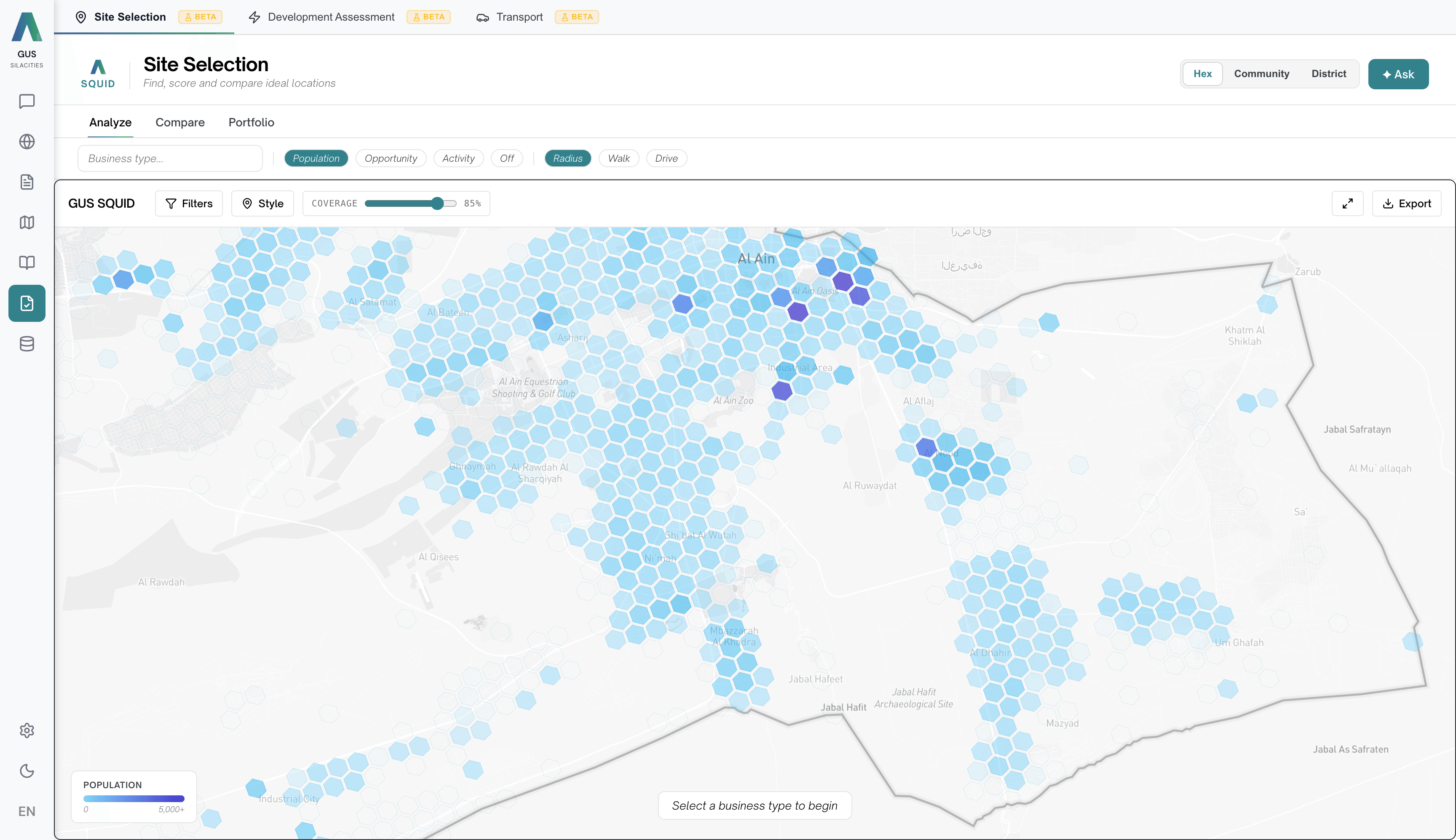
Pick a business. Set the catchment. Click a hex. Read the AnalysisPanelV2.
Four steps from question to defensible answer.
Set the business type
Type into the Business type field to search and select one or more types · each becomes a removable chip. The business type tells Competition which category to assess saturation against, and shapes what Score highlights as a strength or gap.
Set the travel mode and discovery layer
Three Travel Mode pills · Radius for a straight-line circle, Walk isochrone or Drive isochrone for time-based catchments. Before clicking a hex, switch on a Discovery Layer · Population, Opportunity, Activity, or Off · to see where to look. The Scale picker switches between Hex, Community and District.
Click a hex
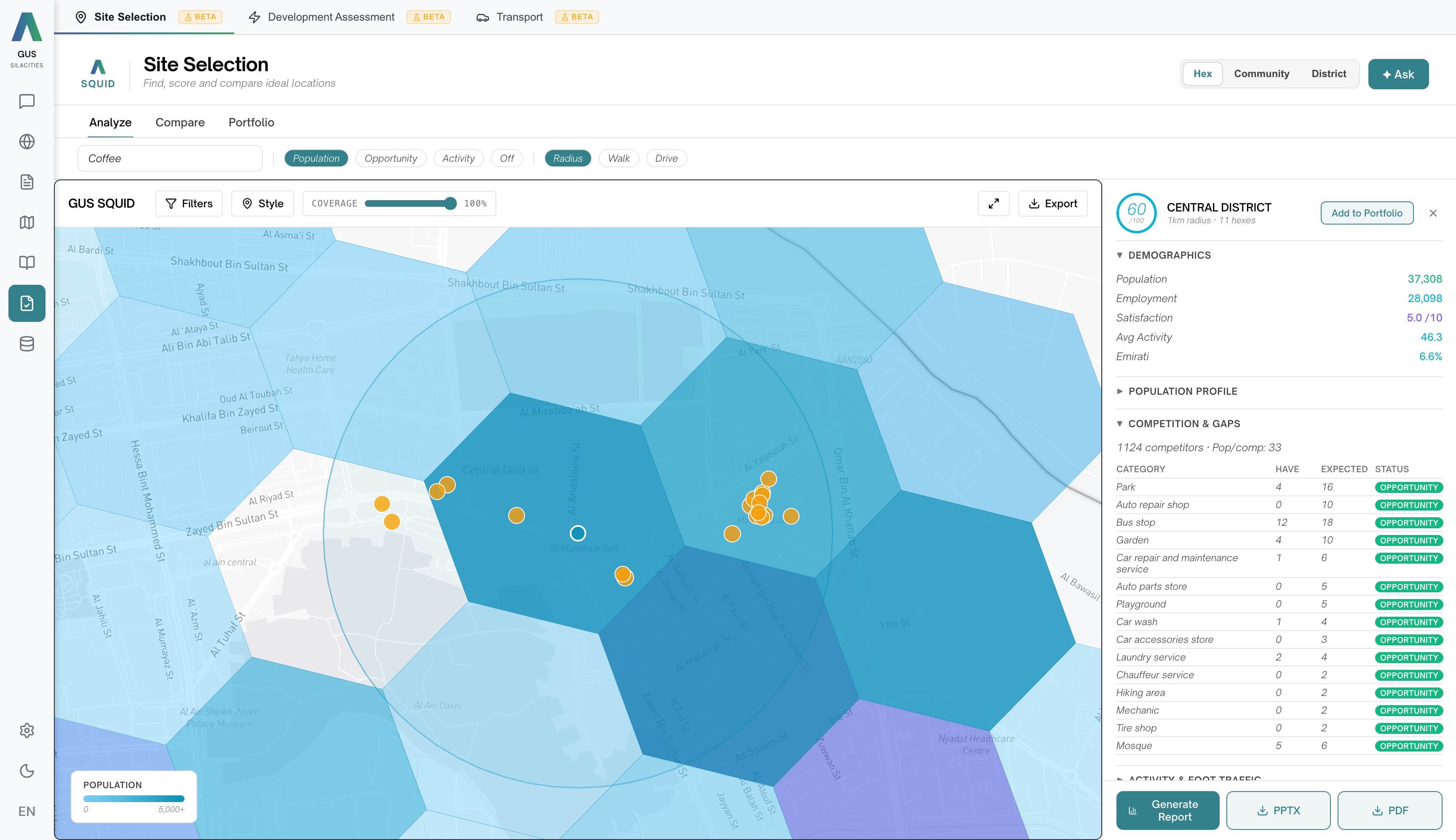
SQUID runs the analysis for the catchment around that hex and opens the AnalysisPanelV2 on the right.
Read the five-tab breakdown
Population, Satisfaction, Foot Traffic, Competition, Score. The Competition tab carries a Market Gaps table tagged Opportunity, Saturated or Balanced. The Score tab shows the composite 0 to 100 with each sub-score’s contribution. Click Add to Portfolio to save the site.
One score that survives the IC pack.
Every SQUID score is the equal-weighted average of four analytical layers, fused against the same neighbourhood grid. Read the breakdown before the headline · a 70 with a 20 on Competition tells a different story to a 70 with a 20 on Population.
Population
Resident count, age mix, household composition and density inside the catchment. Estimated from telecom, mobility and satellite signals, no census dependency. Answers · who lives here?
Satisfaction
Average resident satisfaction across survey topics for the catchment, from the Social Atlas engine. Higher satisfaction typically signals a more stable, engaged community · relevant when customer trust or reputation matters.
Foot Traffic
Busyness and pedestrian activity in the catchment, from the Urban Pulse feeds. A location can look demographically strong but quiet · which changes the case depending on whether your business generates its own footfall or depends on passing trade.
Competition
How many competitors in your selected category are already operating in the catchment. Includes a Market Gaps breakdown · each competitor category labelled Opportunity, Saturated or Balanced based on how it compares to the citywide rate.
Composite score bands · 75 to 100 Strong fit, 50 to 74 Workable, 25 to 49 Weak fit, 0 to 24 Poor fit. The Opportunity Weights panel (defaults Population 50, POI Gap 20, Satisfaction 30) controls the city-wide discovery heatmap only · it shifts where you look first, not the 0 to 100 of any scored site. Click the ✦ Ask button to open the AI Site Finder for plain-English searches like "high foot traffic near a park with low competition for coffee".
Find the right site, anywhere in the city.
Before you pin a site, switch on a Discovery Layer to read the city by the metric your decision turns on. The same neighbourhood grid, different lens.
Population
Highlights hexes with high residential density. Right-size your catchment before you commit · a café and a specialist clinic need very different population counts at very different distances.
Opportunity
Highlights areas with gaps in your selected category. Shaped by the Opportunity Weights sliders for Population, POI Gap and Satisfaction. The fastest answer to "where should I even be looking?"
Activity
Highlights hexes with high foot traffic. Pair with the Travel Mode you actually expect customers to use · a short walk for a café, a longer drive for a destination.
Where SQUID earns its place in the IC pack.
Compare up to three sites
Add sites to Portfolio from the Score tab, then switch to Compare. Three columns side by side across Composite plus the four sub-scores. The best value per row highlights green, the worst red · scan across at a glance without doing the arithmetic.
Find the hole in the market
The Competition tab’s Market Gaps table labels every competitor category in your catchment Opportunity, Saturated or Balanced relative to the citywide rate. Where is the area underserved, where is it crowded, where is it in equilibrium · answered in one table.
Portfolio · server-side, exportable
Sites added from Analyze persist server-side to your account, not just the browser. Each card shows the composite, sub-scores, business type, catchment and travel mode. Per-card Export downloads a PDF site card or a PowerPoint investor deck with the full breakdown.
It saved us a fortnight on the first candidate list. Twelve sites scored and ranked before the weekly review.