
Should this development be approved here?DAT walks the answer.
GUS DAT is the development review tool inside GUS, built for the planning officer, the regulator, and the committee that has to defend the decision in writing. Pin a plot, pull its regulations, run a five-stage assessment from site to compliance to impact, and export a Development Control Report. Two operating modes. Pre-application for an early steer, Review for a submitted scheme. Where the data is not there yet, DAT says so on the page rather than fabricating a number.
A development review your committee can sign.
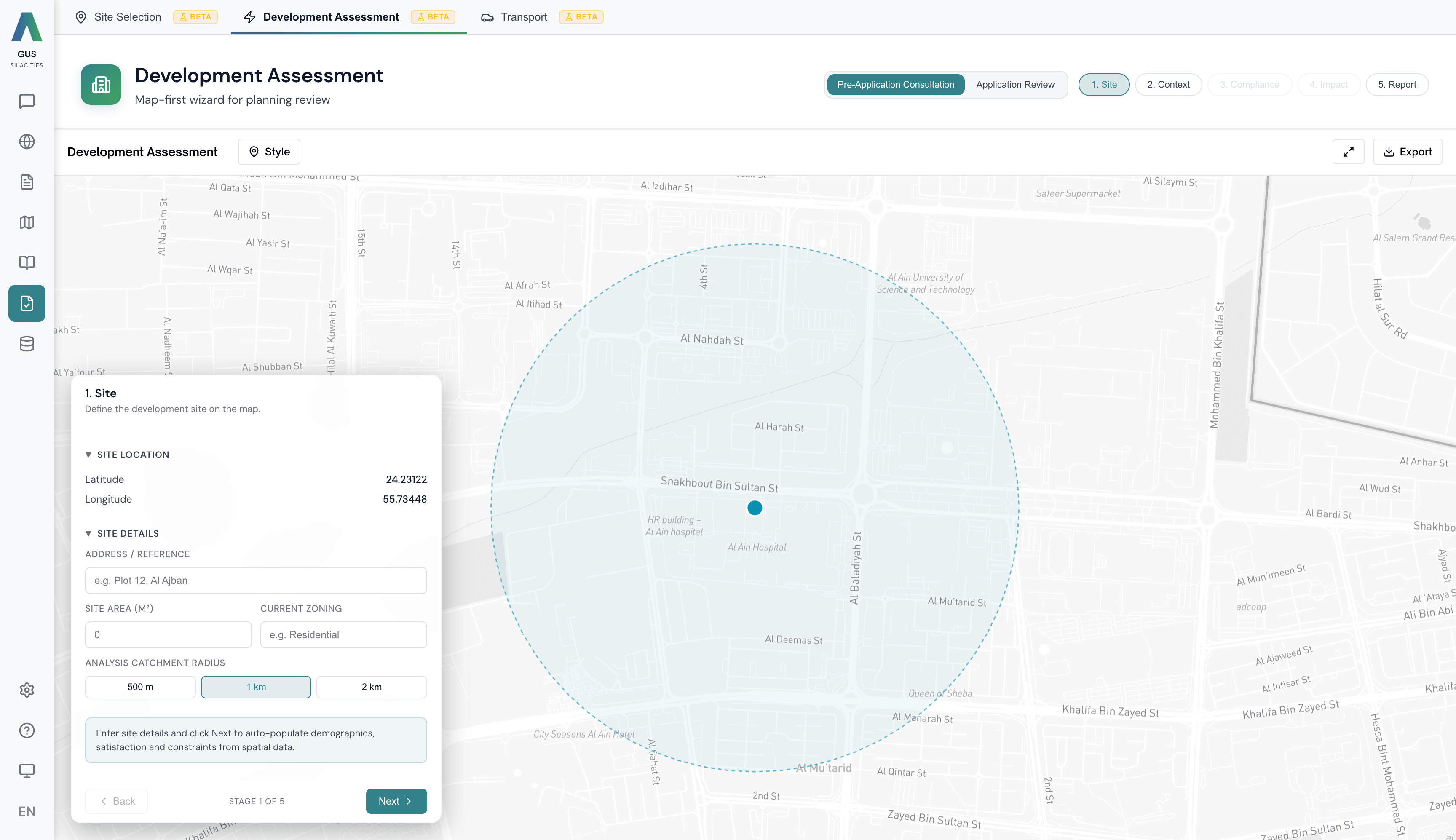
DAT walks the assessment in the order a committee reads it. Each stage tracks completion, and the report writes itself as you progress.
Pin the site
Drop a pin on the parcel. DAT pulls plot boundaries, the zoning designation, FAR, height limits, setbacks and any heritage or hazard overlays that govern what can go here.
Read the context
Surrounding land use, demographics, transport access, infrastructure capacity and resident sentiment. Every input is tagged with its source so the committee can audit the read.
Check compliance
Test the proposal (use, GFA, units, height, parking) against the plot regulations. DAT flags every breach with the rule cited, the value submitted, and the threshold required.
Run the impact
Transport load, infrastructure pressure, economic uplift and environmental effect modelled at the catchment scale. Pre-application gets a directional read; Review gets a numbered impact statement.
Ship the report
Generate the Development Control Report. Approve, approve with conditions, or refuse. Conditions are pre-drafted from the compliance flags. Export to PDF for the committee pack.
Every flag, traced to its rule.
Every DAT review is a sequenced read across five analytical layers. Each draws from a different GUS engine, fused against the same parcel grid. The report is the audit trail.
Site
Plot regulations, zoning designation, FAR, height limits, setbacks, heritage overlays, hazard overlays. The legal envelope a scheme has to fit inside.
Context
Surrounding land use, demographics, transport access, infrastructure capacity, resident satisfaction. Tagged by source family with refresh dates so you can see what is current and what is not.
Compliance
Use, GFA, unit count, height, parking, amenity tested rule by rule against the plot regulations. Every breach cites the rule, the submitted value, and the threshold.
Impact
Transport load, infrastructure pressure, economic uplift and environmental effect modelled at the catchment scale. Confidence intervals reported, assumptions listed.
Report
A Development Control Report assembled from every stage above. Approve, approve with conditions, refuse. Conditions pre-drafted from compliance flags. Exports as the committee pack.
Two operating modes. Pre-Application Consultation runs the five stages above for an early steer before the file is submitted. Application Review adds a sixth stage between Impact and Report — a formal Application Review pass against the submitted package, with every figure traced back to its source.
What makes DAT defensible in the committee room.
Two operating modes
Pre-Application Consultation runs five stages for an early steer with the applicant. Application Review runs six — adds a formal review pass between Impact and Report, against a submitted scheme that has to be decided.
Data honesty, on the page
Where a dataset is missing, stale or low-confidence, DAT shows a Data Not Available state with the reason. No fabricated numbers, no silent fallbacks. The committee sees what is known and what is not.
DCR export, in one click
Generate a Development Control Report shaped for the planning committee. Approve, approve with conditions, refuse. Conditions pre-drafted from the compliance flags. Export as PDF for the pack.
It cut a fortnight off the report cycle on the first scheme we ran through it. Compliance flags came pre-cited.