
Should this plan work where it lands?Plan Assessment scores it.
GUS Plan Assessment is the strategic plan evaluation tool inside GUS, built for the policy team, the master planner and the committee that has to approve a city's next move. A five-stage wizard reads the plan as your own structure · Vision, Themes, Objectives · then checks it for internal coherence, grounds every objective against live city data, scores any number of delivery options, and ranks them on a Scoreboard with an Impact vs Feasibility matrix. Every score is traceable. Where the data is not strong enough to score honestly, the stage says so on the page.
From a plan in draft to a recommendation you can defend.
A horizontal stage strip lets you move freely. Each completed stage carries a teal dot. The plan moves through four statuses · Setup, Consistency checked, Baseline checked, Options assessed.
Stage 1 · Plan Setup
Define plan metadata, pick from eleven plan types (Master Plan, Sector Plan, Citywide Strategy, Local Development Plan, Transport Masterplan and more), write the Vision, and build the Themes with weights and the Objectives nested beneath. Add objectives manually, Import from document, or AI Suggest. Fields auto-save on blur.
Stage 2 · Consistency Check
AI scores each objective 0 to 10 across internal consistency, cross-theme conflicts, coverage gaps and measurability. Badges read Aligned (≥ 6, green), Conflict (3 to 5.9, amber), Low (< 3, red), or Not scored (grey). A Measurable / Hard to measure flag sits on every objective.
Stage 3 · Baseline Alignment
AI compares each objective against live GUS city data and returns one of four categorical verdicts · Supported (green), Partially Supported (amber), Challenged (red), or No Data (grey). Evidence bullets and data-gap notes sit under every verdict.
Stage 4 · Option Assessment
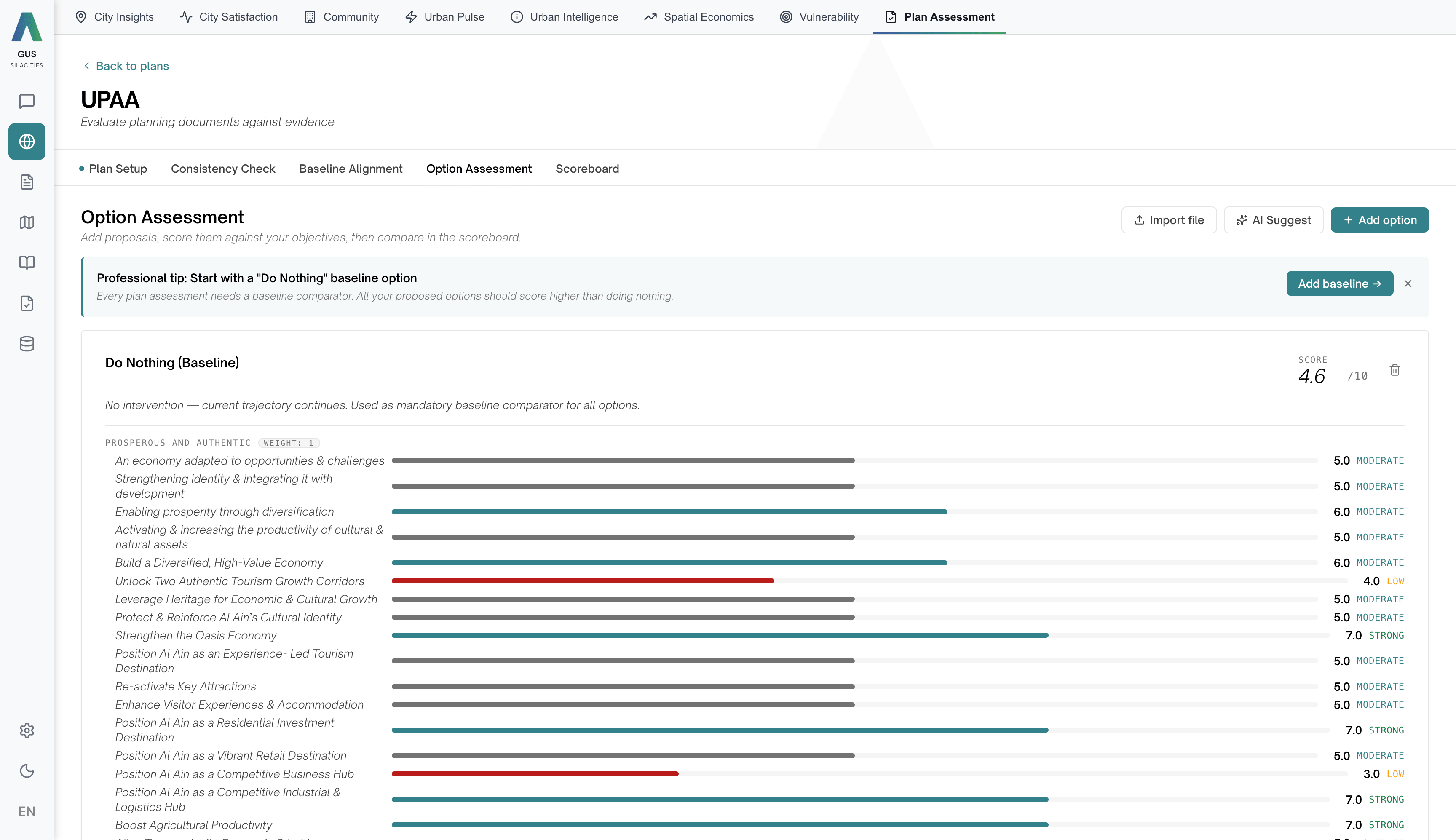
Add delivery options manually, by file import or AI-suggested. Start with a Do Nothing baseline. Each option is scored 0 to 10 against every objective, plus four feasibility sub-scores · Financial Viability, Implementation Timeline, Risk Level (inverted · 10 = low risk), Stakeholder Acceptance. View Scoreboard unlocks after two options are assessed.
Stage 5 · Ranked Scoreboard
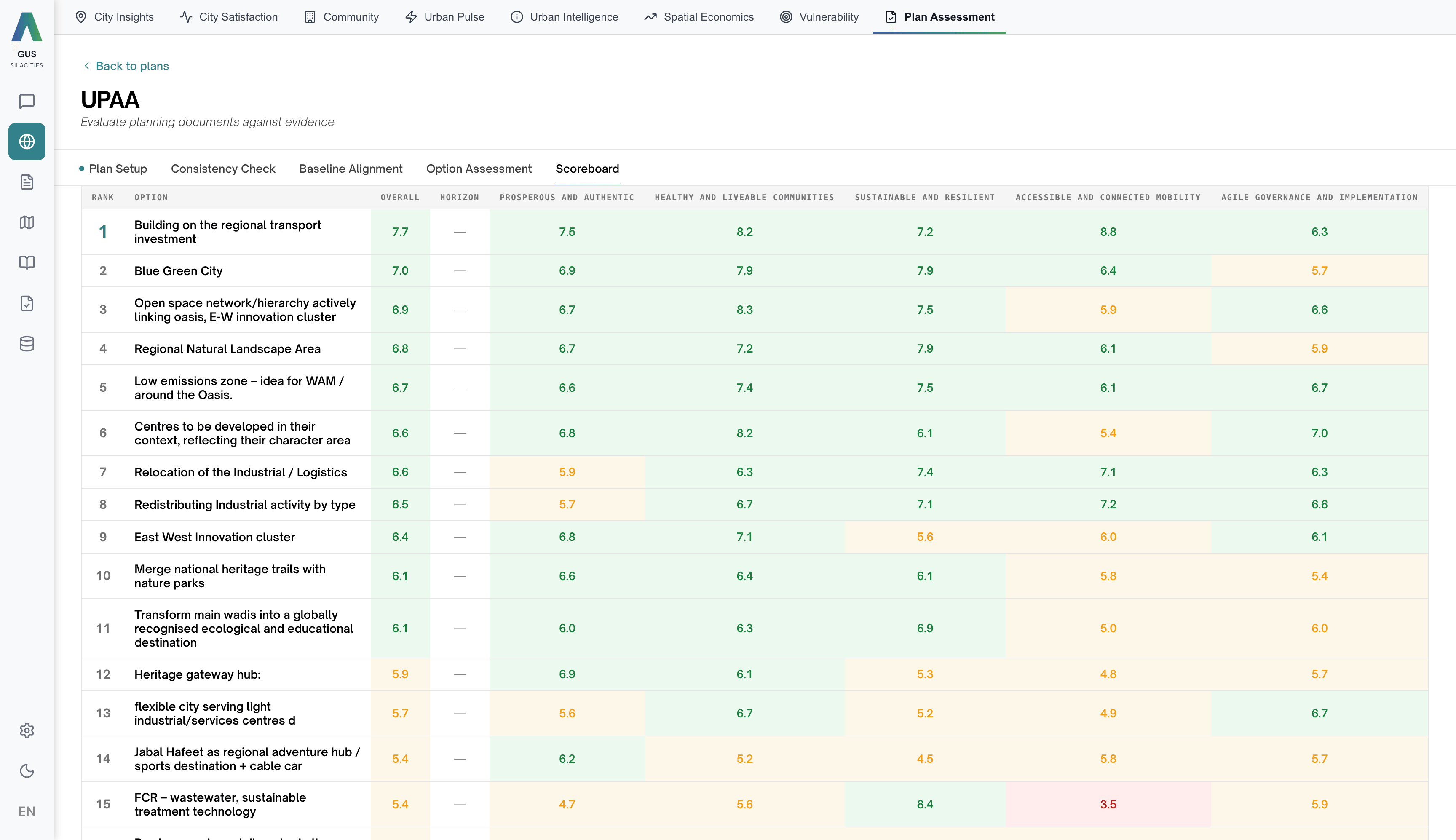
Server-ranked table, KPI band, Impact vs Feasibility 2x2 (Priorities, Aspirations, Quick Wins, Drop), AI Portfolio Insights, and a Weight Simulator with per-theme sliders for non-destructive scenario testing. Export PDF report, share with team or tenant members. Public links are not available.
Every score traced back to the data.
Plan Assessment is entirely table and score-based · there is no map in this tab. The plan's own Vision, Themes and Objectives are the framework. Each stage adds a layer of evidence to it.
Plan Setup
Plan metadata plus a three-level hierarchy · Vision (free-text aspirational statement), Themes (named thematic areas with numeric weights), Objectives (goals nested under themes, each with KPI, target and linked policies). Eleven plan types available. The marketing lens you may know as Land · People · Movement · Policy lives here, expressed as your own Themes rather than a fixed list.
Consistency Check
0 to 10 per objective · Aligned · Conflict · Low · Not scored, plus Measurable / Hard to measure. An Overall Score with KPI tiles for Themes, Objectives and Conflicts. Results go stale if you edit the plan · a banner prompts a manual re-run.
Baseline Alignment
Categorical verdicts against live city data · Supported, Partially Supported, Challenged, No Data. Reads the same fused dataset the rest of the platform reads · satisfaction, demographics, economic indicators, activity. Challenged is a flag for discussion, not a verdict.
Option Assessment
0 to 10 per objective for every delivery option, plus four feasibility sub-scores. Weighted Overall reflects the theme weights from Plan Setup. The Scoreboard unlocks once at least two options are assessed · pattern is a Do Nothing baseline plus one or more real options.
Ranked Scoreboard
Final output · ranked table colour-coded > 6 green / 4 to 6 amber / < 4 red, KPI band, Impact vs Feasibility 2x2, AI Portfolio Insights, Weight Simulator for client-side scenario testing. Server-ranked. Export PDF, share with team or tenant.
If the marketing brief you've seen describes Plan Assessment in terms of Land, People, Movement and Policy lenses, those are the strategic frames you'd ladder back into the plan's Themes. In the product, every plan brings its own theme structure with its own weights · the engine reads what you wrote rather than fitting your work into a fixed grid.
What makes a Plan Assessment defensible in the committee room.
The plan brings its own structure
Vision, Themes, Objectives · with weights you set, KPIs you define and policies you link. AI Suggest and Import from document seed the structure in minutes when starting from a draft on your desk.
Stale-aware scoring
Edit the plan after Stage 2 or Stage 3 and a banner makes the staleness visible. Nothing silently re-runs · the committee always sees a result tied to a known version of the plan, plus a Not scored badge where the AI returned nothing.
Weight Simulator without rewriting the plan
On the Scoreboard, per-theme sliders (0.5 to 5.0) re-rank the options in real time without changing the saved weights. Test "what if we prioritised Mobility 2x?" in front of leadership, then close the panel and the original ranking stands.
We ran a master plan that had taken three months to draft through Plan Assessment in an afternoon, and the policy team walked into the next committee with a sourced suitability score on every section.